Your API authenticates every request with a bearer token in the Authorization header. It works for fetch, for your mobile app, for your integration tests. Then you add a realtime feature, open a WebSocket from the browser, and reach for the same header.
There is nowhere to put it.
This isn’t a bug in your framework, and no server-side setting will fix it. It’s a limit of the browser API. This article explains exactly where the limit is, the five ways to authenticate a browser WebSocket anyway, and what each one costs you.
The header you can’t set
Here is the entire constructor of the browser’s WebSocket API, as MDN documents it:
new WebSocket(url)
new WebSocket(url, protocols)
A URL, and optionally a list of subprotocols. That’s it. The browser builds the opening handshake itself (Upgrade, Sec-WebSocket-Key, Origin and the rest) and gives your code no hook to add a header of your own.
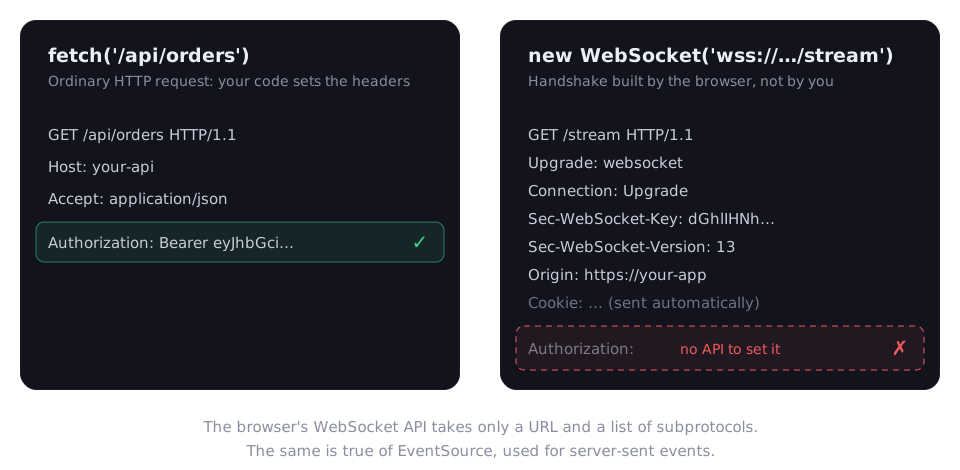
Server-sent events have the same gap. The EventSource constructor takes a URL and an options object whose only field is withCredentials.
It’s worth being precise about whose limit this is. The WebSocket protocol itself doesn’t forbid headers. RFC 6455 says it “doesn’t prescribe any particular way that servers can authenticate clients during the WebSocket handshake,” and that a server “can use any client authentication mechanism available to a generic HTTP server, such as cookies, HTTP authentication, or TLS authentication.” A .NET or Node client can send Authorization on the handshake without any trouble. Only the browser can’t.
Microsoft’s SignalR documentation puts it plainly: “browsers can’t set custom headers, such as Authorization, on the WebSocket and Server-Sent Events APIs.” And: “The query string fallback is a browser API constraint, not a limitation of SignalR or the WebSocket protocol.”
So the question is never “how do I set the header”. It’s “what else can carry the identity”.
Option 1: cookies
If your web app already uses a cookie session, you may have no problem at all. The browser attaches cookies to the WebSocket handshake automatically, exactly as it does for any other request to that site. SignalR’s documentation notes that with cookie authentication, the connection “automatically inherits” the signed-in user.
The cost is a vulnerability you must close yourself: Cross-Site WebSocket Hijacking. Because the browser sends cookies on its own, a malicious page can try to open a WebSocket to your server and ride the user’s session. The OWASP WebSocket cheat sheet names the cookie behavior as what makes the attack possible.
You can’t lean on CORS here. The ASP.NET Core WebSockets documentation is explicit: “The protections provided by CORS don’t apply to WebSockets.” Browsers don’t send preflight requests for them. What they do send is the Origin header, which, as OWASP points out, malicious JavaScript can’t override. So check it, against an allowlist:
var webSocketOptions = new WebSocketOptions();
webSocketOptions.AllowedOrigins.Add("https://app.example.com");

app.UseWebSockets(webSocketOptions);
Mind the default. Microsoft documents that for AllowedOrigins, “by default, all origins are allowed.” An empty list is not a locked door. RFC 6455 recommends answering an unacceptable origin with 403 Forbidden.
Fits: same-site web apps with cookie sessions. Doesn’t fit: APIs that are token-only, or clients on other domains.
Option 2: the token in the query string
This is what SignalR itself does. When the client runs in a browser, “SignalR sends the token as a query string parameter” for WebSockets and server-sent events, as access_token, and the server reads it back during authentication. The pattern from the documentation, adapted to a plain endpoint:
builder.Services
    .AddAuthentication(JwtBearerDefaults.AuthenticationScheme)
    .AddJwtBearer(options =>
    {
        options.Events = new JwtBearerEvents
        {
            OnMessageReceived = context =>
            {
                var token = context.Request.Query["access_token"];
                if (!string.IsNullOrEmpty(token) &&
                    context.HttpContext.Request.Path.StartsWithSegments("/stream"))
                {
                    context.Token = token;
                }
                return Task.CompletedTask;
            }
        };
    });
Notice the path check: the query string is accepted on one endpoint only. Every other route keeps requiring the header.
The cost is where URLs end up. TLS encrypts the query string in transit, but Microsoft’s own documentation warns that “many servers log query string values,” and OWASP advises avoiding “tokens in URL query strings because they can leak into access logs.” A long-lived access token sitting in a proxy log is a credential anyone with log access can replay.
If you take this route, shrink the blast radius:
- Issue a separate token for the stream: short-lived, and scoped to that one endpoint.
- Accept the query string on that endpoint only, as above.
- Strip or redact
access_tokenfrom every log you control: the app, the reverse proxy, the load balancer.
Fits: SignalR in the browser, or teams that control their whole logging path.
Option 3: a one-time ticket
The ticket pattern keeps the real credential where it belongs, in a header, and puts something nearly worthless in the URL.
- The browser calls a normal HTTP endpoint, with its normal
Authorizationheader, and asks for a ticket. - The server stores a random ticket for that user with a very short expiry, and returns it.
- The browser opens the WebSocket with only the ticket in the query string.
- The realtime endpoint redeems the ticket, deleting it in the same operation, and accepts the connection as that user.
If that URL lands in a log, the entry is useless: the ticket was consumed on first use and would have expired within seconds anyway.
“Consumed on first use” has to be atomic, or two connections racing with the same ticket can both get in. IDistributedCache won’t do it on its own: its interface offers get, set, refresh and remove as separate calls. Redis has the operation built in. GETDEL, available since Redis 6.2.0, returns a key’s value and deletes it in one command, and StackExchange.Redis exposes it as StringGetDeleteAsync from version 2.2.79.
app.MapPost("/realtime/tickets", async (ClaimsPrincipal user, IConnectionMultiplexer redis) =>
{
    var ticket = Convert.ToHexString(RandomNumberGenerator.GetBytes(32));
    await redis.GetDatabase().StringSetAsync(
        $"ticket:{ticket}",
        user.FindFirstValue(ClaimTypes.NameIdentifier),
        TimeSpan.FromSeconds(30));
    return Results.Ok(new { ticket });
}).RequireAuthorization();

app.Map("/stream", async (HttpContext context, IConnectionMultiplexer redis) =>
{
    if (!context.WebSockets.IsWebSocketRequest)
    {
        context.Response.StatusCode = StatusCodes.Status400BadRequest;
        return;
    }

    var ticket = context.Request.Query["ticket"].ToString();
    var userId = await redis.GetDatabase().StringGetDeleteAsync($"ticket:{ticket}");
    if (userId.IsNullOrEmpty)
    {
        context.Response.StatusCode = StatusCodes.Status403Forbidden;
        return;
    }

    using var socket = await context.WebSockets.AcceptWebSocketAsync();
    // userId is the authenticated caller for the life of this connection
});
RandomNumberGenerator.GetBytes(int) produces cryptographically strong bytes and is available from .NET 6. Keep the Origin allowlist from option 1 in front of this as well.
Fits: bearer-token APIs using raw WebSockets, where you don’t control every log the URL passes through. Costs: one extra request per connection, and a shared store such as Redis when you run more than one instance.
Option 4: authenticate in the first message
You can also leave the URL clean and authenticate inside the connection. OWASP’s cheat sheet prefers exactly this for browser clients: send the token “in the first message over WSS,” and until it validates, the server accepts only the authentication message and sends no protected data.
In practice:
- Accept the socket, then start a short timer.
- The first message must be the credential. Anything else, or silence until the timer fires, closes the socket with status 1008 (policy violation),
WebSocketCloseStatus.PolicyViolationin .NET. - Only after validation does the connection join any group, topic or stream.
The cost is that your message protocol now owns authentication. Every message handler has to know whether the connection is authenticated yet, and frameworks that authenticate at the HTTP layer, such as ASP.NET Core’s authorization middleware, can’t help you with it.
Fits: custom protocols where you control both ends of the message format.
Option 5: let a proxy add the header
If your browser app already talks to its own backend-for-frontend, the problem may disappear. Microsoft’s SignalR documentation notes that a reverse proxy, such as YARP fronting a backend-for-frontend, “can also add the Authorization header to the proxied WebSocket request, so the backend authenticates with the header instead of the query string.”
The browser authenticates to the proxy with a cookie, and the proxy authenticates to the API with a header. Your API keeps a single authentication model. The browser side still needs option 1’s Origin check, because the browser-to-proxy hop is cookie-based.
Fits: teams that already run a backend-for-frontend or an API gateway.
How to choose
| Your situation | Use |
|---|---|
| Same-site web app with a cookie session | Cookies, with an Origin allowlist |
| SignalR in the browser | Its built-in query string token, kept short-lived, with logs redacted |
| Bearer tokens, raw WebSockets, logs you don’t fully control | One-time tickets |
| A custom message protocol you own end to end | First-message authentication |
| An existing backend-for-frontend or gateway | Let the proxy add the header |
Whatever you choose
Authentication at the handshake is only the start of a connection that may stay open for hours. From the OWASP cheat sheet:
- Validate
Originon every handshake, against an allowlist rather than a denylist. - Close connections when sessions expire. A logged-out user shouldn’t keep a live stream.
- Re-validate long-lived connections periodically. OWASP calls every 30 minutes common.
And use wss:// only, so the handshake, any ticket or token in it, and every message travel over TLS.
Summary
- The browser’s
WebSocketandEventSourceAPIs can’t set custom headers. That’s a browser API limit, not a protocol one: non-browser clients can sendAuthorizationon the handshake. - Cookies work automatically, but expose you to Cross-Site WebSocket Hijacking. CORS doesn’t apply, so allowlist
Originyourself, and remember that ASP.NET Core allows every origin by default. - A token in the query string is what SignalR does in browsers. It works, but URLs end up in logs, so keep that token short-lived and narrowly scoped.
- A one-time ticket keeps the real credential in a header and leaves nothing replayable in the URL, provided redemption is atomic, as with Redis
GETDEL. - First-message authentication keeps the URL clean, at the price of owning authentication in your message protocol.
- A backend-for-frontend can add the header for you and keep your API on one authentication model.
The obvious fix doesn’t exist. The right one is the option whose cost you can actually afford.